Digital Social Media Marketing Planner: A Comprehensive Guide to Streamlining Your Online Strategy
Managing a digital social media marketing strategy can be complex, especially with multiple platforms and varying content types. The Digital Social Media Marketing Planner offers a structured approach to organizing your efforts, ensuring consistency, efficiency, and measurable results. Whether you're an individual creator or a business owner, this tool provides the framework needed to plan, execute, and track your social media campaigns effectively.
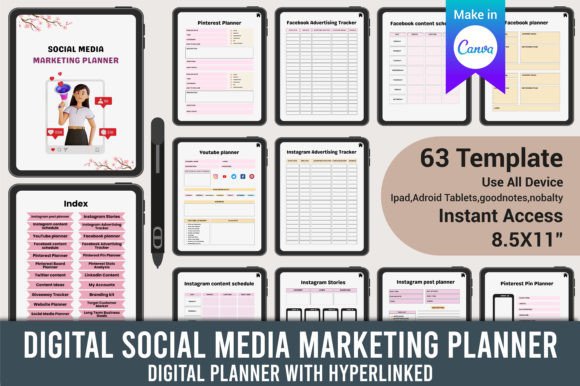
One of the key benefits of using a Digital Social Media Marketing Planner is its ability to streamline content creation and scheduling. With the help of an Editable Digital Social Media Marketing Planner Canva Template, users can customize their planning process without needing advanced design skills. This template allows for easy editing using a free Canva account, making it accessible to a wide range of users. Once completed, the planner can be exported in high-quality PDF, JPEG, or PNG formats, ensuring that your plans are both professional and practical.
Key Components of the Digital Social Media Marketing Planner
The Digital Social Media Marketing Planner includes a variety of essential elements that cover all aspects of your online presence. These components help ensure that your marketing efforts are well-organized and aligned with your business goals.
- Index: A detailed table of contents that allows quick navigation through different sections of the planner.
- Instagram Post Planner: A section dedicated to planning and scheduling Instagram posts, including content themes, captions, and hashtags.
- Instagram Stories: A guide for creating engaging stories that align with your brand voice and audience preferences.
- Instagram Content Schedule: A calendar that outlines when and how often to post on Instagram, helping maintain a consistent presence.
- Instagram Advertising Tracker: A tool to monitor the performance of your Instagram ads, including metrics like engagement rates and conversion costs.
- YouTube Planner: A section for planning video content, including topics, scripts, and upload schedules.
- Facebook Planner: A guide for managing Facebook posts, pages, and ads, ensuring a cohesive brand message across platforms.
- Facebook Content Schedule: A timeline for posting on Facebook, tailored to your audience's behavior and preferences.
- Facebook Advertising Tracker: A tracking system for Facebook ad performance, including click-through rates and return on investment.
- Pinterest Planner: A section for planning and organizing pins, ensuring your content reaches the right audience.
- Pinterest Pin Planner: A guide for creating visually appealing pins that drive traffic to your website or blog.
- Pinterest Board Planner: A tool for organizing Pinterest boards around specific themes or product categories.
- Pinterest Stats Analysis: A feature for analyzing Pinterest analytics, such as impressions, clicks, and engagement rates.
- Twitter Content: A section for crafting tweets, including hashtags, mentions, and engagement strategies.
- LinkedIn Content: A guide for creating professional posts, articles, and updates that build thought leadership.
- Content Ideas: A repository of creative ideas for posts, videos, and campaigns that keep your content fresh and relevant.
- My Accounts: A centralized hub for managing all your social media accounts, including login details and platform-specific settings.
- Giveaway Tracker: A tool for planning and monitoring social media giveaways, ensuring they meet your marketing objectives.
- Branding Kit: A collection of brand assets, including logos, color schemes, and typography guidelines.
- Website Planner: A section for aligning your website content with your social media strategy, ensuring a unified brand experience.
- Target Customer Market: An analysis of your ideal audience, including demographics, interests, and pain points.
- Social Media Planner: A comprehensive overview of your entire social media strategy, from content creation to performance analysis.
- Long Term Business Goals: A roadmap for achieving your business objectives through social media marketing.
- Financial Goal Tracker: A tool for setting and monitoring financial targets, such as revenue growth and cost management.
- Goal Action Plan: A step-by-step guide for achieving your marketing goals, including timelines and responsibilities.
- Annual Finance: A section for tracking annual financial data, including budgets and expenses related to social media marketing.
- Annual Profit Loss: A summary of your annual profits and losses, providing insights into the effectiveness of your marketing efforts.
- Coupons Promotion: A guide for creating and promoting coupons through social media, driving customer engagement and sales.
- Marketing Plan: A detailed strategy outlining your marketing objectives, tactics, and expected outcomes.
- Project Planner: A tool for managing social media projects, including deadlines, tasks, and team collaboration.
- Seasonal Promotions: A section for planning promotions around holidays, events, and seasonal trends.
- Release Date: A calendar for scheduling the release of new products, services, or content.
- Product SEO Checklist: A list of SEO best practices for optimizing product pages and listings.
- Product Research: A guide for researching and analyzing products to identify market opportunities.
- Product Pricing: A tool for determining competitive pricing strategies based on market research and cost analysis.
- Campaign Manager: A feature for managing and tracking the performance of your marketing campaigns.
- Product Ideas: A brainstorming section for generating new product concepts and innovations.
- Pre-launch Costs: A breakdown of costs associated with launching a new product or service.
- Keywords Research: A guide for identifying and targeting relevant keywords to improve search engine visibility.
- Competitor Analysis: A tool for analyzing competitors' strategies, strengths, and weaknesses.
- Product Updates: A section for tracking and communicating product improvements and new features.
- SEO Keyword Focus: A focus on keyword optimization to enhance your website's search engine ranking.
- Task Chart: A visual representation of tasks and deadlines, helping teams stay organized and on track.
- Budget Tracker: A tool for monitoring and managing your social media marketing budget.
- Customer Feedback: A section for collecting and analyzing customer feedback to improve your offerings.
- Order Tracker: A system for tracking orders and customer interactions, ensuring timely fulfillment and support.
- Weekly To Do List: A weekly task list to keep your team focused and productive.
- Meeting Notes: A space for recording important discussions, decisions, and action items from meetings.
- Website Planner: A guide for aligning your website content with your social media strategy, ensuring a consistent brand experience.
- Post: A section for planning and publishing social media posts, including content types, visuals, and timing.
How to Use the Digital Social Media Marketing Planner
Using the Digital Social Media Marketing Planner involves several steps, starting with defining your goals and audience. Begin by identifying your primary objectives, such as increasing brand awareness, driving sales, or improving customer engagement. Once your goals are clear, determine your target audience by analyzing demographics, interests, and behaviors. This information will help shape your content strategy and platform choices.
Next, create a content calendar that outlines what type of content you'll post, when, and on which platforms. This helps ensure a balanced mix of promotional, educational, and engaging content. Use the Instagram Post Planner and YouTube Planner to organize your visual and video content, while the Twitter and LinkedIn sections help manage your text-based posts.
Track your progress using the various trackers included in the planner, such as the Instagram Advertising Tracker and Facebook Advertising Tracker. These tools allow you to measure the success of your campaigns and make data-driven adjustments. Additionally, the Competitor Analysis section helps you stay ahead of the competition by understanding their strategies and adapting yours accordingly.
Finally, review and update your planner regularly to reflect changes in your business, audience, or market trends. This ensures that your social media strategy remains relevant and effective over time.
Benefits of Using the Digital Social Media Marketing Planner
The Digital Social Media Marketing Planner offers numerous advantages that can significantly enhance your marketing efforts. One of the main benefits is improved organization, as it provides a centralized location for all your planning activities. This reduces the risk of missed deadlines, inconsistent messaging, and wasted resources.
Another advantage is increased efficiency. By having a structured plan in place, you can save time on content creation and scheduling, allowing you to focus on other important aspects of your business. The Editable Digital Social Media Marketing Planner Canva Template further enhances efficiency by enabling quick edits and customizations without requiring advanced design skills.
The planner also promotes better decision-making. With access to analytics and performance data, you can identify what works and what doesn't, allowing you to refine your strategies for optimal results. Additionally, the Financial Goal Tracker and Budget Tracker help you manage your resources more effectively, ensuring that your marketing efforts remain cost-efficient.
Lastly, the Digital Social Media Marketing Planner supports long-term growth. By aligning your social media strategy with your business goals, you can build a strong online presence that drives sustainable success. Whether you're a small business owner or a digital marketer, this tool provides the foundation needed to achieve your marketing objectives.